

GA Release: 5/28/26
Admin 2.0 will be live on May 28th!
As announced in our May 21 release notes, Admin 2.0 is a ground-up redesign of the ID Dataweb Admin Console. On the 28th it will be live for all customers in our pre-production and production environments! Your existing workflows, policies, and configurations are all intact – the upgrade is to the interface you use to manage them.
Now, lets take a closer look at what's new!
Workflow Builder & Policy Manager
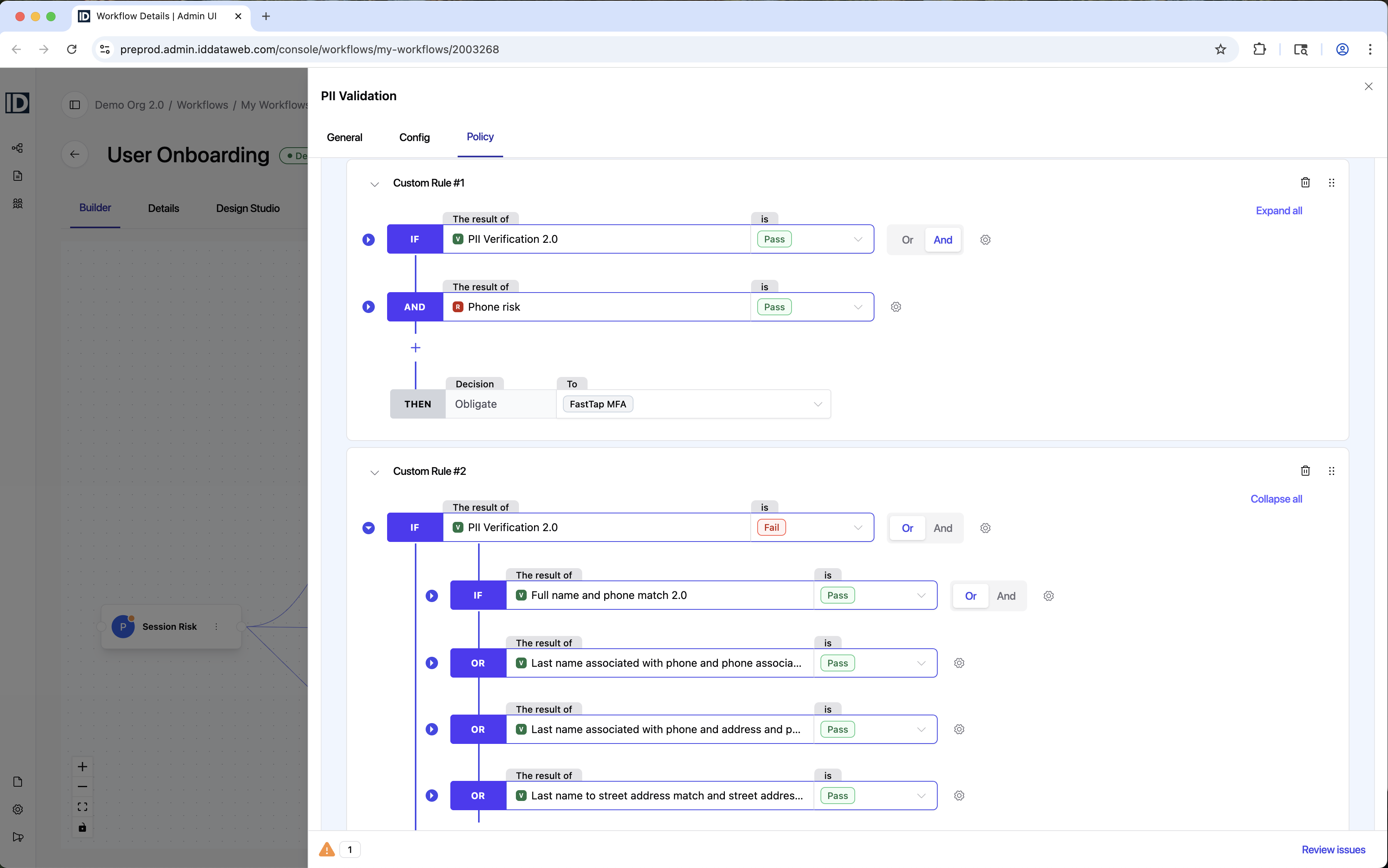
The Builder is a visual, interactive workflow canvas where you build and manage workflows and their individual steps in one place.
- In the current Admin Console, the workflow visualizer is read-only and step configurations lived behind a series of separate tabs and modals. In Admin 2.0, everything converges: click any step in the canvas to open a side panel with its configuration settings right next to the canvas.
- The Policy Manager, accessible from the Policy tab within any step, replaces the legacy policy editor with a more visual rule builder. Browse and select from pre-built group templates, or start from scratch, create/modify rule logic, and configure inline retry settings per rule. Recent platform upgrades like cross-step rules and additional operators are all available here.
- Admin 2.0 also introduces more actionable configuration feedback. Errors and warnings are flagged in real time with clear descriptions and resolution guidance, so you can catch and fix issues before deployment instead of discovering them in production.
Workflow & Step Template Galleries
Choosing the right combination of identity checks for a given use case – which vendors to layer, what step-up logic to include, how to balance friction against fraud risk – requires deep domain knowledge. Template Galleries bring our team's expertise directly into the console. Workflow and step templates are built on the latest fraud pattern intelligence and best practices, giving you a guided starting point whether you're standing up a new identity proofing flow, adding document verification to an existing workflow, or exploring what a layered approach looks like for your specific use case.
Check out the updated Step and Workflow documentation for details on what's available.
Transaction Details Report
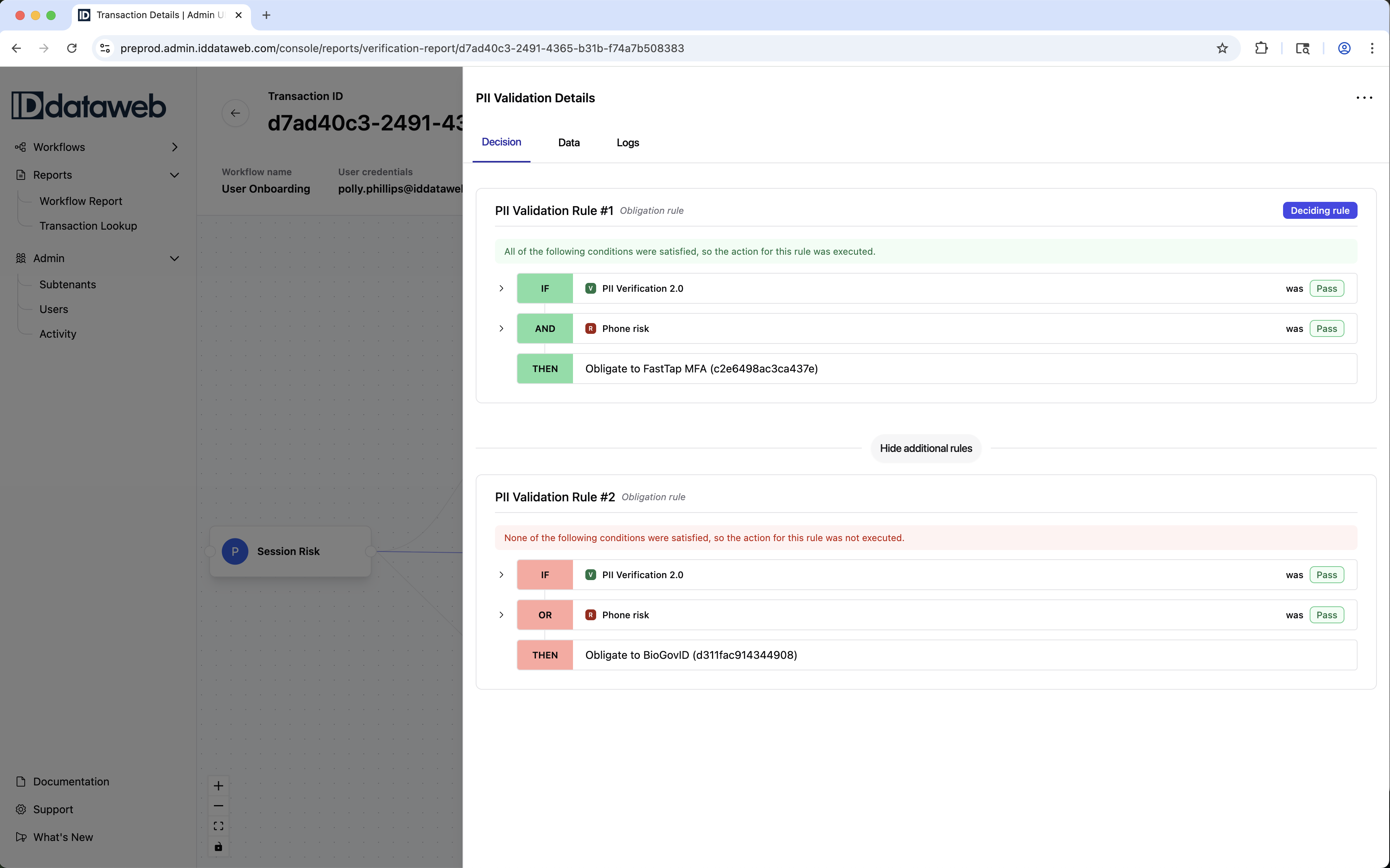
The transaction investigation experience has been completely rethought. For starters, at the top of the new Transaction Details overview page, you can now see the last step completed for each transaction, so agents and investigation teams can immediately see where a user dropped off without having to dig into multiple step-level reports. Moving down the page, you see a visualization of the full workflow with the transaction's path highlighted, giving you instant context for what happened and where. From there, click any step to open a detail panel with three tabs:
- Decision: This tab surfaces the specific rule that drove the outcome front and center, supported with full rule logic and whether each condition was satisfied.
- Data: This tab shows Inputs submitted, checks with pass/fail status, and acquired data from each checker, so you can see all data that went into and came out of the transaction, regardless of whether it was considered in the policy logic.
- Logs: This tab shows the event-by-event trace with processing times and scores.
This replaces the flat, vertically stacked Verification Details page where policy decisions, scores, claims, and events were all displayed in a single scroll without any indication of what drove the transaction outcome, where the user dropped off, or what inputs were evaluated.
Design Studio
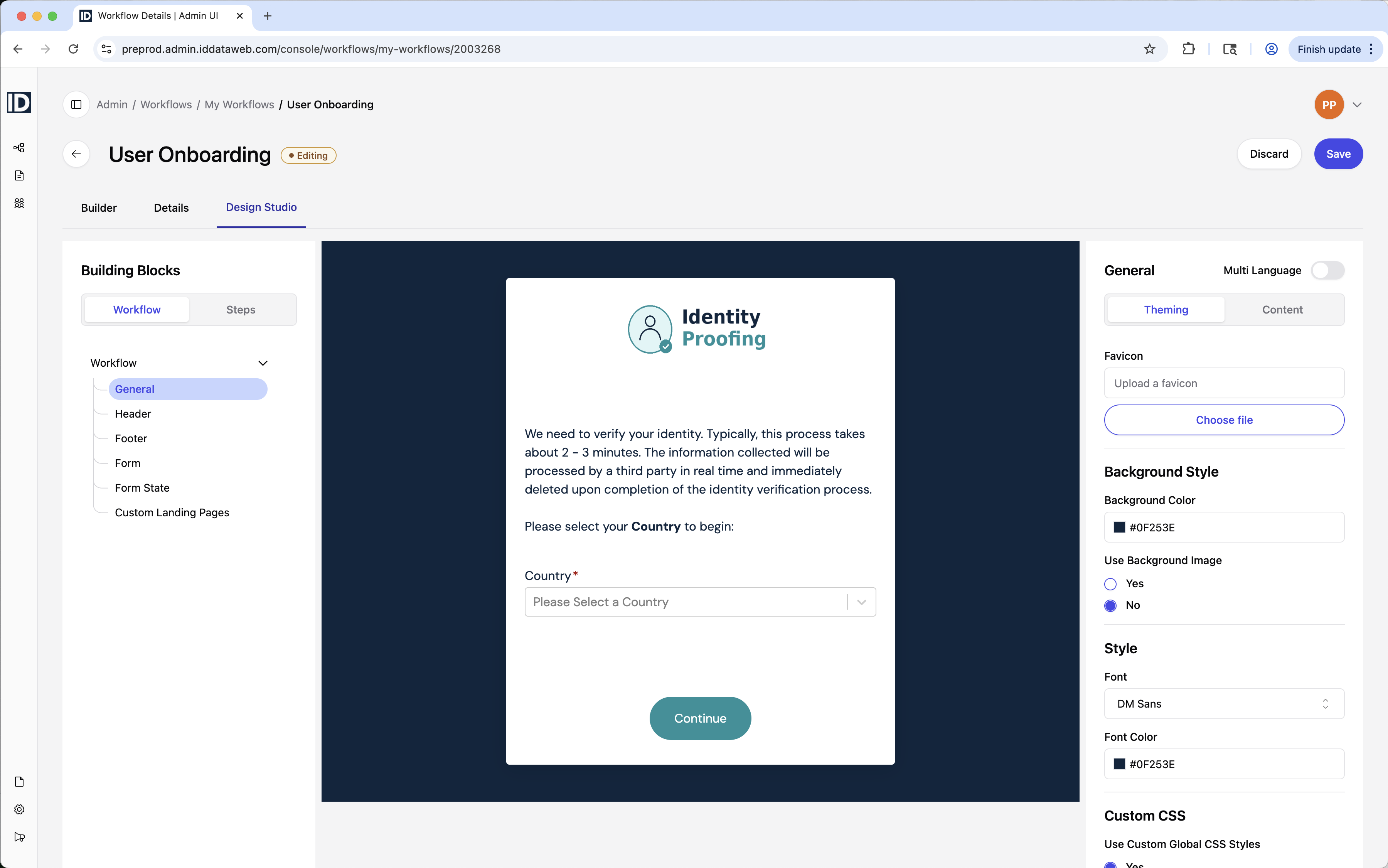
The Design Studio consolidates what was previously a collection of 10+ theming sub-tabs (scattered across both workflow-level and step-level settings) into a single visual editor with a live preview. Customize the end-user identity proofing experience with building blocks for headers, footers, forms, form states, and custom landing pages. Change fonts, colors, favicons, and custom CSS, and see the results in real time.
Generating Verification Links
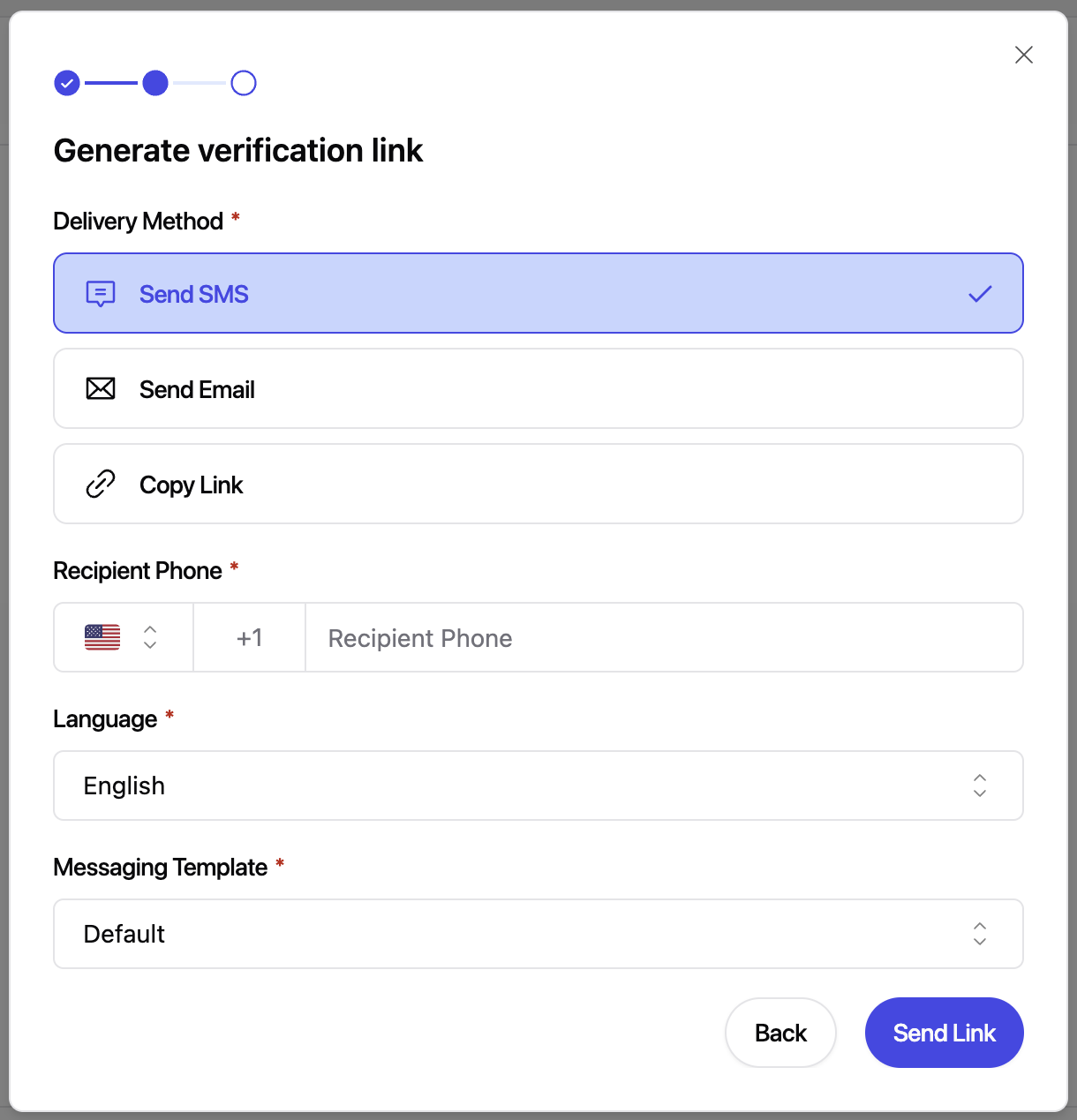
Generating and sending verification links has been streamlined. Fields that agents shouldn't need to modify (like expiration settings) are hidden to reduce complexity and errors, and the path to initiating a verification has been made much more intuitive.
In the current Admin Console, sending a link via SMS or Email, copying a link, and starting a verification session where an agent fills in information were all separate menu items (Send Verification Link, Copy Link, and Try Now). In Admin 2.0, these are consolidated into two clear actions:
- Generate verification link: A simple flow that walks the agent through the essential inputs, then has them select the delivery method (Send SMS, Send Email, or Copy Link) and insert info needed for that delivery method
- Start verification session: Formerly "Try Now" – a simple form for agent-assisted flows where information is entered directly on behalf of the user.
What You Need to Know
What this means for you
- All of your existing workflows continue to be accessible in both the current Admin Console and Admin 2.0 – nothing breaks and nothing disappears.
- No one will be rushed to switch before you're ready. The current Admin Console will remain available for the foreseeable future.
- Both versions include a toggle to switch between them, so you can dip a toe in to test the waters without having to blindly commit to the upgrade.
- A small number of non-critical features are still being built out in Admin 2.0, so you'll use the current console for those in the meantime. Save your work before flipping the toggle, as you won't be dropped directly into the same spot in the other version.
- Admin 2.0 does not affect your APIs, integrations, or live workflows. This is a front-end redesign of the admin console. Getting comfortable
Getting comfortable in the new console
- When you open the new console, you'll be greeted with in-app guides to walk you through the new interface as you explore.
- Additionally, beta documentation for the new console and templates is live in the Guides section of this site. We are currently refining and building out documentation, but if you're interested in a beta-grade preview, take a peek.
- Customer webinar – We're hosting a live walkthrough and Q&A the second week of June. Registration links will be emailed to our customers on May 28th.
Still have questions? Reach out to your ID Dataweb account team with any remaining questions, or to get a sneak preview!