
API Integration of MobileMatch + FastTap MFA
Table of Contents
-
- Request Schema
- Response Schema
-
- Country Selection Request Schema
- Country Selection Response Schema
- PII Submission Request Schema
- PII Submission Response Schema
-
- Send Link Request Schema
- Send Link Response Schema
- Status Request Schema
- Status Response Schema
-
- Request Schema
- Response Schema
Overview
This guide describes how to use the AXN Verify API to verify an individual using International MobileMatch. The flow validates an individual’s identity attributes (name, address, phone) and confirms phone possession via a FastTap (one-time link) challenge.
Prerequisites
1. Get Access Token
(POST) https://api.preprod.iddataweb.com/v1/token
API Reference: https://docs.iddataweb.com/reference/auth
This access token is used to authenticate your requests. Place this token in the header of each subsequent request. See the postman project above for examples.
Locate your workflow's access keys
Access Token Request Schema
var axios = require('axios')

var user = 'Your Starting Workflow Service API Key';
var password = 'Your Starting Workflow Service Shared Secret';

var base64encodedData = Buffer.from(user + ':' + password).toString('base64');

var request = async () => {
  var response = await axios({
    url: 'https://api.preprod.iddataweb.com/v1/token',
    method: 'post',
    params: {
      grant_type: 'client_credentials'
    },
    headers: {
      'Content-Type': 'application/json',
      'Cache-Control': 'no-cache',
      Authorization: 'Basic ' + base64encodedData
    }
  })
  console.log(response.data)
}
request();
Access Token Response Schema
{
  "errorCode": "string",
  "errorDescription": "string",
  "access_token": "string",
  "expires_in": "integer",
  "token_type": "Bearer"
}
2. MobileMatch PII
(POST) https://api.preprod.iddataweb.com/v1/slverify
API Reference: https://docs.iddataweb.com/v1.0/reference/slverify
The /slverifyendpoint is used multiple times during MobileMatch to:
- Confirm country eligibility
- Submit personal information (PII)
- Retrieve policy decisions and forward API keys. Each request returns a forwardApiKey .
- If the individual's PII and Phone Number match active phone records,
/slverifywill return a policyDecision of obligation, and also allow them to receive an OTP (via SMS or voice). - If the individual's PII and Phone Number do not match,
/slverifywill return a policyDecision of deny, and the workflow will not continue.
Country Selection Request Example
var data = {
	"apikey": "Your API Key",
    "credential": "e.g. : [email protected]",
    "appID":"Your App Name, (e.g. 'Employee Onboarding App')",
    "userAttributes": [
        {
            "attributeType": "Country",
            "values": {
                "country": "US" // accepted values: (country codes) e.g. "US", "MX", "AU" ....
            }
        }
    ]
}

var axios = require('axios')
var token = 'YOUR_BEARER_TOKEN'

var request = async () => {
  var response = await axios({
    url: 'https://api.preprod.iddataweb.com/v1/slverify',
    method: 'post',
    data: data,
    headers: {
      'Content-Type': 'application/json',
      'Cache-Control': 'no-cache',
      Authorization: 'Bearer ' + token,
    }
  })
	console.log(response.data)
}
request();
Country Selection Response Schema
{
  "errorCode": "string",
  "errorDescription": "string",
  "transaction_id": "string",
  "userAttributes": [],
  "userAssertionList": [],
  "mbun": "string",
  "forwardApiKey": "string",
  "policyObligation": true,
  "policyDecision": "obligation"
}
PII Submission Request Example
var axios = require('axios')
var token = 'YOUR_BEARER_TOKEN' // -- obtained from step 1 --

var data = {
  "apikey": "string",
  "credential": "string",
  "appID": "string",
  "asi": "string",
  "userAttributes": [
    {
      "attributeType": "FullName",
      "values": {
        "fname": "John",
        "mname": "",
        "lname": "Smith"
      }
    },
    {
      "attributeType": "InternationalAddress",
      "values": {
        "country": "US",
        "administrative_area_level_1": "VA",
        "locality": "Vienna",
        "postal_code": "23225",
        "route": "Liberty St",
        "street_number": "123"
      }
    },
    {
      "attributeType": "InternationalTelephone",
      "values": {
        "dialCode": "1",
        "telephone": "1234567890"
      }
    }
  ]
}

var request = async () => {
  var response = await axios({
    url: 'https://api.preprod.iddataweb.com/v1/slverify',
    method: 'post',
    data: data,
    headers: {
      'Content-Type': 'application/json',
      'Cache-Control': 'no-cache',
      Authorization: 'Bearer ' + token
    }
  })
  console.log(response.data)
}
request();
PII Submission Response Schema
{
  "errorCode": "string",
  "errorDescription": "string",
  "transaction_id": "string",
  "userAttributes": [],
  "acquiredAttributes": [],
  "userAssertionList": [],
  "policyDecision": "approve | deny"
}
3. FastTap Phone Possession
FastTap is used to confirm phone possession by sending a one-time challenge to the verified phone number.
(GET) https://api.preprod.iddataweb.com/v1/doccapture/sendlink
(POST) https://api.preprod.iddataweb.com/v1/async-ui/qr-code
API Reference:
- https://api.preprod.iddataweb.com/v1/doccapture/sendlink
- https://api.preprod.iddataweb.com/v1/async-ui/qr-code
- Use
/send-linkto automatically send the FasTap link to the user.- Use
/qr-codeto generate the QR-code for manual delivery.
Click here to enable and read more about QR-code generation.
/doccapture/sendlink Request Example
/doccapture/sendlink Request Examplevar axios = require("axios");
var token = "YOUR_BEARER_TOKEN"; // -- obtained from step 1 --
var params = {
dialCode: "1",
telephone: "1234567890",
apikey: "YOUR_FASTTAP_MFA_API_KEY",
credential: "USERNAME",
appID: "YOUR_APPLICATION_NAME",
};
var request = async () => {
var response = await axios({
url: "https://api.preprod.iddataweb.com/v1/doccapture/sendlink",
method: 'get',
params: params,
headers: {
"Content-Type": "application/json",
"Cache-Control": "no-cache",
Authorization: "Bearer " + token,
},
});
console.log(response.data);
};
request();/doccapture/sendlink Response Schema
/doccapture/sendlink Response Schema{
"responseCode": "string",
"errorDescription": "string",
"asi": "string",
"status": "SUCCESS"
}/doccapture/sendlink w/ Custom Text Request Example
/doccapture/sendlink w/ Custom Text Request Examplevar axios = require("axios");
var token = "YOUR_BEARER_TOKEN"; // -- obtained from step 1 --
var data = {
dialCode: "1",
telephone: "1234567890",
apikey: "YOUR_FASTTAP_MFA_API_KEY",
credential: "USERNAME",
appID: "YOUR_APPLICATION_NAME",
explanationHTML: "Hello, in order to to complete your transfer of <b>$___</b> from account #1234 to <b>Account Name</b>, please click the Continue button below"
};
var request = async () => {
var response = await axios({
url: "https://api.preprod.iddataweb.com/v1/doccapture/sendlink",
method: 'post',
data: data,
headers: {
"Content-Type": "application/json",
"Cache-Control": "no-cache",
Authorization: "Bearer " + token,
},
});
console.log(response.data);
};
request();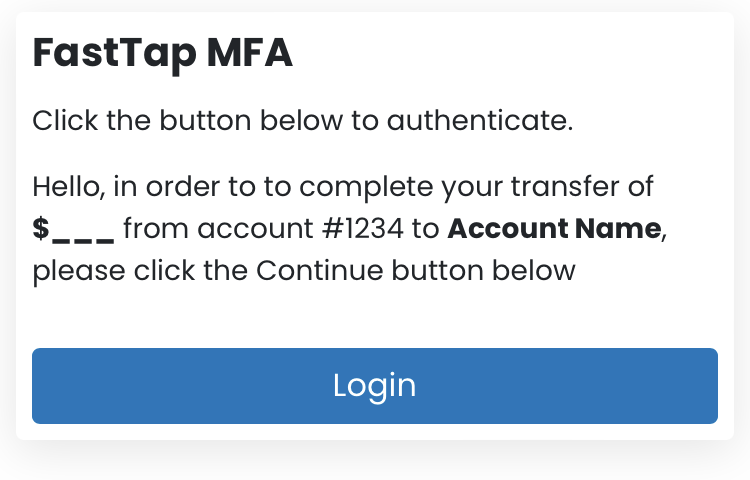
/async-ui/qr-code Request Example
/async-ui/qr-code Request Examplevar data = {
"apikey": "YOUR_API_KEY",
"credential": "[email protected]",
"appID": "Your Application Name",
"country": "US",
"idpType": "",
"userAttributes": [
{
"attributeType": "InternationalTelephone",
"values": {
"dialCode": "1",
"telephone": "1234567890"
}
},
{
"attributeType": "FullName",
"values": {
"fname": "First",
"mname": "",
"lname": "Last"
}
}
]
}
var axios = require('axios')
var token = 'YOUR_BEARER_TOKEN'
var request = async () => {
var response = await axios({
url: 'https://api.preprod.iddataweb.com/v1/async-ui/qr-code',
method: 'post',
data: data,
headers: {
'Content-Type': 'application/json',
'Cache-Control': 'no-cache',
Authorization: 'Bearer ' + token
}
})
console.log(response.data)
}
request()
/async-ui/qr-code Response Schema
/async-ui/qr-code Response Schema{
"services": [
{
"apTransactionId": "string",
"name": "FastTap MFA Verification",
"qrCode": "data:image/png;base64,<BASE64_QR_CODE>",
"status": "initialized",
"apSessionId": "string"
}
],
"asi": "string"
}(optional) / Status Request Example
(GET) https://api.preprod.iddataweb.com/v1/doccapture/results
API Reference: https://api.preprod.iddataweb.com/v1/doccapture/results
Confirm the user's completion of FastTap.
Periodically, resend /doccapture/results to confirm the status of the FastTap link. We advise this be done every 3-5 seconds.
FastTap Status Request Example
var axios = require("axios");
var token = "YOUR_BEARER_TOKEN"; // -- obtained from step 1 --

var params = {
  asi: "YOUR_SESSION_ID" // -- obtained from step 3 --
};

var request = async () => {
  var response = await axios({
    url: "https://api.preprod.iddataweb.com/v1/doccapture/results",
    method: 'get',
    params: params,
    headers: {
      "Content-Type": "application/json",
      "Cache-Control": "no-cache",
      Authorization: "Bearer " + token,
    },
  });
  console.log(response.data);
};
request();
FastTap Status Response Schema
{
  "responseCode": "string",
  "errorDescription": "string",
  "asi": "string",
  "status": "pending | success"
}
4. Verify FastTap Result
(POST) https://api.preprod.iddataweb.com/v1/slverify
This final call confirms the user’s FastTap challenge and completes MobileMatch verification.
FastTap Verification Request Example
var axios = require("axios");
var token = "YOUR_BEARER_TOKEN"; // -- obtained from step 1 --

var data = {
  "apikey": "string",
  "credential": "string",
  "appID": "string",
  "asi": "string",
  "userAttributes": [
    {
      "attributeType": "FullName",
      "values": {
        "fname": "John",
        "mname": "",
        "lname": "Smith"
      }
    },
    {
      "attributeType": "InternationalAddress",
      "values": {
        "country": "US",
        "administrative_area_level_1": "VA",
        "locality": "Vienna",
        "postal_code": "23225",
        "route": "Liberty St",
        "street_number": "123"
      }
    },
    {
      "attributeType": "InternationalTelephone",
      "values": {
        "dialCode": "1",
        "telephone": "1234567890"
      }
    }
  ]
}


var request = async () => {
  var response = await axios({
    url: "https://api.preprod.iddataweb.com/v1/slverify",
    method: 'post',
    data: data,
    headers: {
      "Content-Type": "application/json",
      "Cache-Control": "no-cache",
      Authorization: "Bearer " + token,
    },
  });
  console.log(response.data);
};
request();
FastTap Verification Response Schema
{
  "errorCode": "string",
  "errorDescription": "string",
  "transaction_id": "string",
  "userAttributes": [],
  "acquiredAttributes": [],
  "userAssertionList": [],
  "policyDecision": "approve | deny"
}
If policyDecision is approve, the individual has successfully passed International MobileMatch verification.
Updated about 1 month ago